Because of accidental deletion, reformatting your hard disk, a system crash, and other reasons, you may lose some precious data. But you can still recover deleted files, and many of those services are free. In this article, we’ll tell you how to recover deleted files hard drive free. You can pick a recovery solution to recover your data without paying for it.
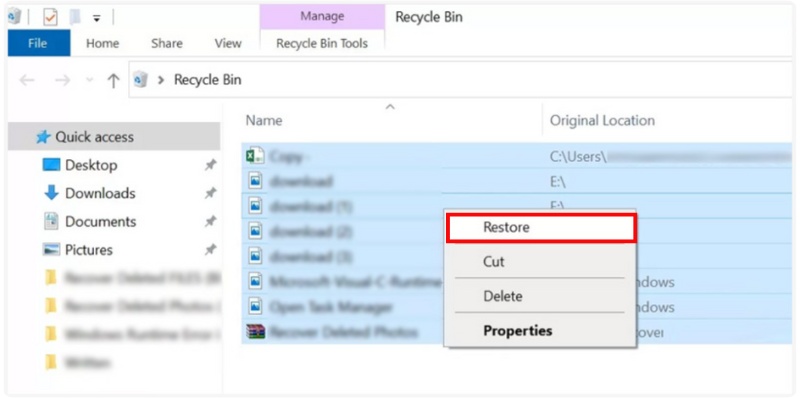
When you accidentally delete a file from your hard drive, it isn’t permanently gone right away. You can often retrieve it from the Recycle Bin (Windows) or Trash (Mac) before it’s overwritten.
If your file has been removed from the Recycle Bin or Trash, Windows’ File History can help you recover it, provided this feature was enabled. File History keeps backups of your documents, pictures, videos, and other important folders.
If you’re using a Mac, you can rely on Máquina del tiempo para recuperar archivos borrados easily. This built-in backup tool saves your entire system, including documents, apps, and system settings, making it one of the best free software to recover deleted files from external hard drive as well.
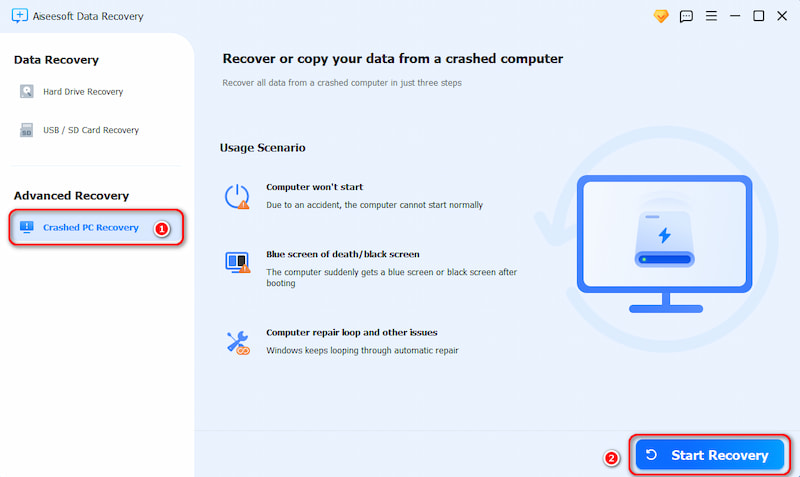
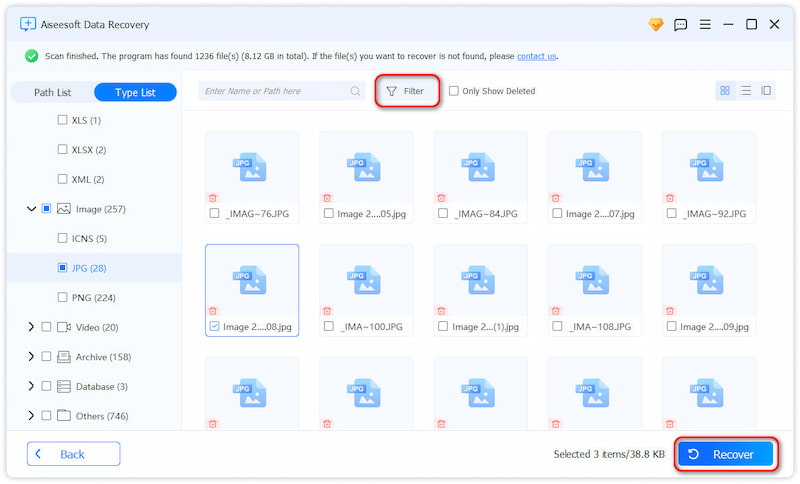
You shouldn't worry if your computer crashes unexpectedly or if your hard drive becomes corrupted; you may still be able to recover your files. A great solution is Recuperación de datos gratuita de Aiseesoft, a professional yet easy-to-use tool that helps retrieve lost or deleted files caused by formatting, system crashes, or accidental deletion. It’s one of the most reliable free software to recover deleted files from hard drive safely and effectively.
Descargas
 100% Seguro. Sin anuncios.
How to Retrieve Data from a Corrupted Hard Drive
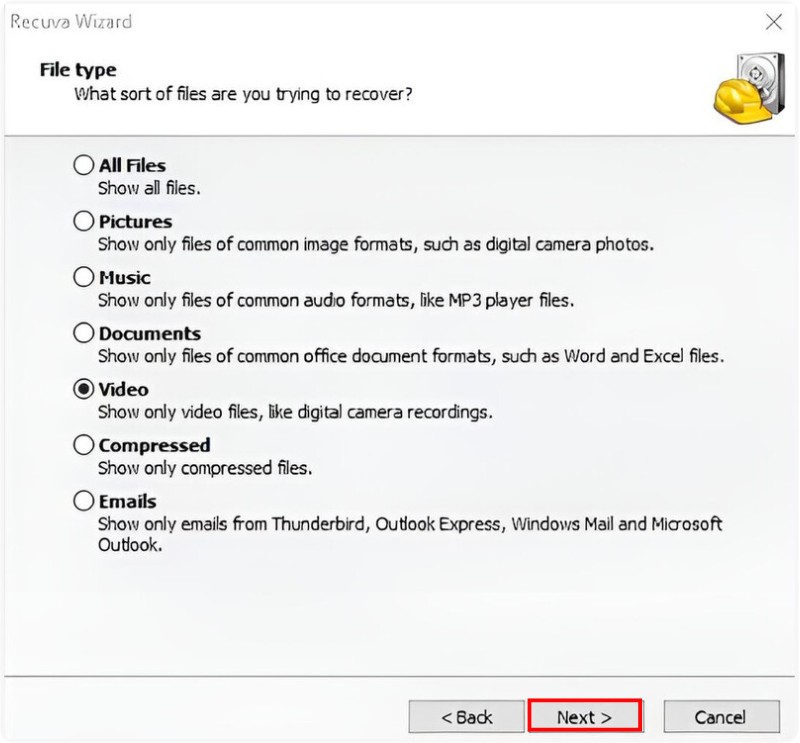
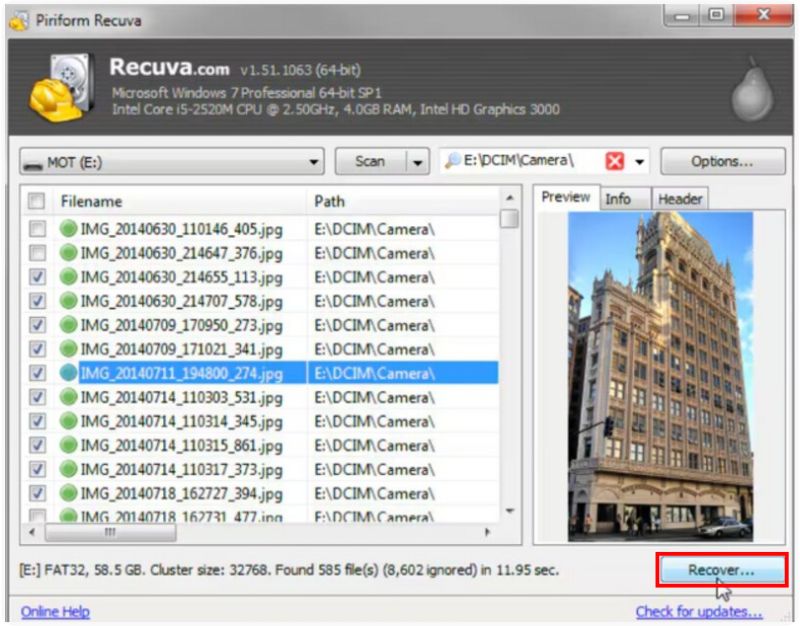
Another great program for recovering lost files is Recuva, a lightweight and free data recovery tool developed by Piriform. It is a great tool for recovering files that you may have accidentally deleted from your hard drive, USB stick, or memory card. You can use Recuva to help you recover lost files, whether they were deleted, formatted, or caused by system errors.
Steps to Retrieve Deleted Files Using Recuva

Is it free to recover permanently erased files from a hard drive?
If you have made a backup or utilized File History, you should be able to recover those files that have been removed permanently from there. If not, recovering them can be more complicated particularly if the data has been written over or if the hard drive was formatted. There are some free ways and tools that you can try to recover your files. However, it is important to keep in mind that it will not guarantee final success. For all these methods start, try the free versions of the programs Recuperación de datos gratuita de Aiseesoft, Disk Drill, TestDisk, or EaseUS Data Recovery Wizard to try and recover your deleted files. If the files are important documents or meaningful photographs, it may be worth pursuing professional help, although these services can be costly.
Is Wondershare Recoverit really free?
Recuperación de Maravilla is not completely free. It offers a free version with limitations. The free version of Recoverit only allows you to scan and preview recoverable files. The amount of data that can actually be recovered is limited. Furthermore, it lacks advanced features. For truly free alternatives, consider other recovery tools, such as Recuva or PhotoRec.
Can I use Windows File Recovery to restore data on Windows 7?
Recuperación de archivos de Windows is not a valid program for Windows 7. It was created by Microsoft for Windows 10 version 2004, and, thus, it can only be used to attempt data recovery on Windows 10 and 11 PCs. If Backup and Restore is enabled in Windows 7, you can attempt to restore data from a backup if it is available. To do so, navigate to Control Panel -> System and Security -> Backup and Restore, then follow the on-screen instructions to restore your files.
Conclusión
You can find three useful ways to recupera archivos borrados de tu disco duro gratis. Indeed, there are additional free data recovery tools available for you to recover lost files. For instance, you can use reputable programs like Recuva and PhotoRec to restore files from hard drives. Don't delay because overwriting data may occur. Plus, always remember to back up your important files to mitigate future loss of data.
 Servicios oficiales de recuperación de datos de Seagate Rescue y las 7 mejores herramientas de recuperación
¿Cuánto cuesta el servicio de recuperación de datos de Seagate Rescue? ¿Cómo recuperar datos de un disco duro externo de Seagate? Aprenda a iniciar su recuperación de datos de Seagate.
 Cómo restaurar la configuración de fábrica en una computadora portátil Lenovo
¿Cómo puedo restablecer los valores de fábrica de mi portátil Lenovo? ¿Cómo forzar el restablecimiento de fábrica de un portátil Lenovo? Aprenda a restaurar un portátil Lenovo a los valores de fábrica.
 Una guía completa para la recuperación de datos de Western Digital
¿La garantía de Western Digital cubre la recuperación de datos? ¿Cuánto cuesta la recuperación de datos de Western Digital? Aprenda a recuperar datos perdidos de discos duros Western Digital.
Recuperar varios datos
1. Software gratuito de recuperación de datos
2. Recuperar archivos borrados en Windows
3. Recuperar archivos borrados de la papelera de reciclaje de Windows
4. Recuperar correos electrónicos eliminados permanentemente
5. Recuperar documento de Word no guardado en Mac
Aiseesoft Data Recovery es el mejor software de recuperación de datos para recuperar fotos, documentos, correos electrónicos, audio, videos, etc. eliminados/perdidos de su PC/Mac.
100% Seguro. Sin anuncios.
100% Seguro. Sin anuncios.

*Campo requerido
*Por favor ingrese un correo electrónico válido