Contenido
Durante el uso diario de su iPhone, se reunirán muchas imágenes valiosas en él. Por diferentes razones, a menudo puede sincronizar o hacer una copia de seguridad de algunos de ellos desde el iPhone a la computadora u otro dispositivo.
Cuando cambias de un iPhone a un teléfono Android como un Samsung, ¿sabes cómo hacerlo rápidamente? transferir fotos de un iPhone a un AndroidLa función para compartir archivos en dispositivos Apple es bastante limitada debido al ecosistema de la compañía. Por lo tanto, puede resultar un poco difícil transferir archivos de iOS, como fotos, de un iPhone a un teléfono Android. Sin embargo, existen maneras sencillas de enviar fotos de iPhone a dispositivos Android. En esta publicación, compartimos 4 métodos efectivos para ayudarte a transferir imágenes de iPhone/iPad/iPod a un dispositivo Android.
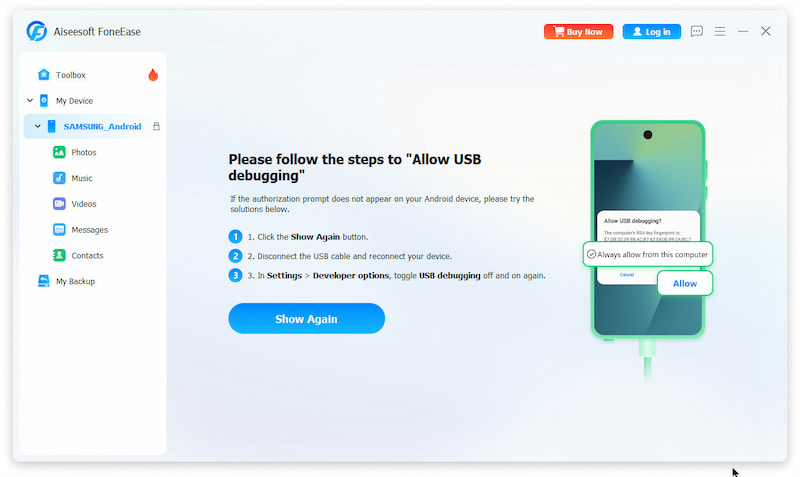
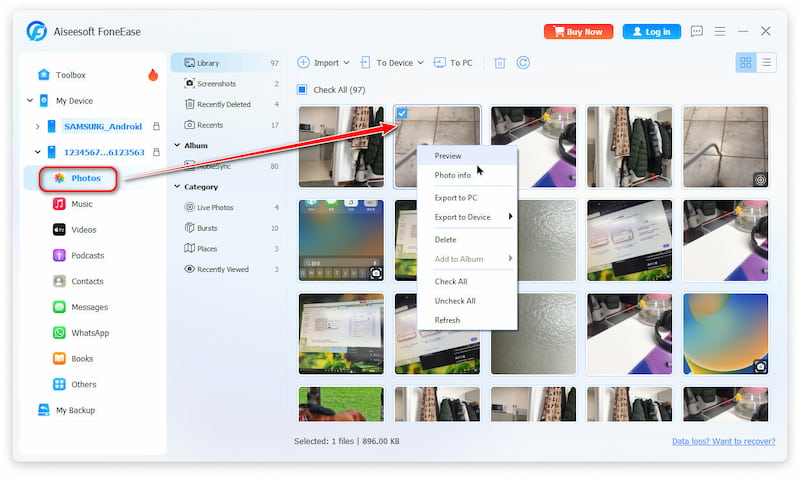
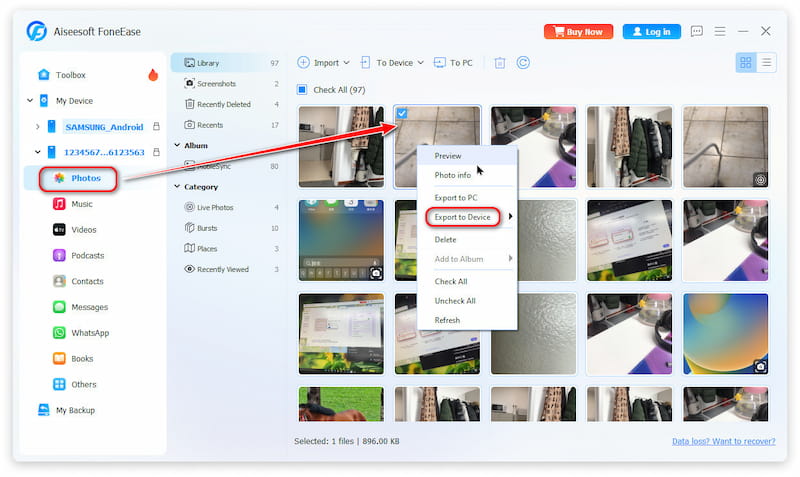
Si quieres enviar fotos de un iPhone a un teléfono Android, la forma más rápida es encontrar una herramienta profesional pero fácil de usar. Aquí te recomendamos encarecidamente la potente aplicación de transferencia de datos para iOS y Android. Aiseesoft FoneEaseNo solo te permite sincronizar directamente las fotos de tu iPhone con tu Android, sino también transferir videos, archivos, mensajes de WhatsApp y mucho más con solo unos clics. Su navegación intuitiva lo hace muy fácil de usar, incluso para principiantes, sin necesidad de aprender a usarlo.
 100% Seguro. Sin anuncios.
Características principales
Usar Google Fotos es otra opción práctica. Sincronizar fotos en diferentes plataformas es gratis. Google Fotos admite videos y el formato HEIC. Sin embargo, se trata de un servicio de almacenamiento en la nube con un límite gratuito de 15 GB.
¿Cómo transfiere Google Fotos las imágenes de un iPhone a un Android?

iCloud brinda una forma muy conveniente de sincronizar imágenes entre dispositivos iOS como iPhone, iPad y iPod. En realidad, también te permite descargar fotos desde el iPhone a la computadora. Después de eso, puede copiar fácilmente estas fotos de iPhone a un teléfono Android con facilidad.
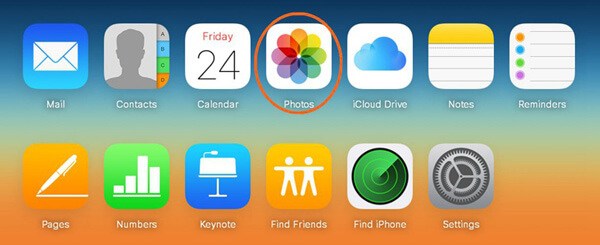
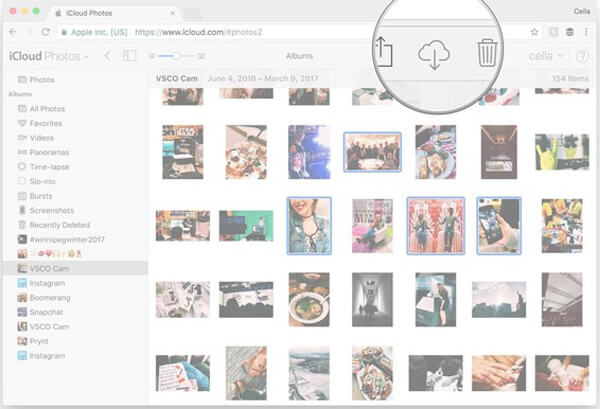
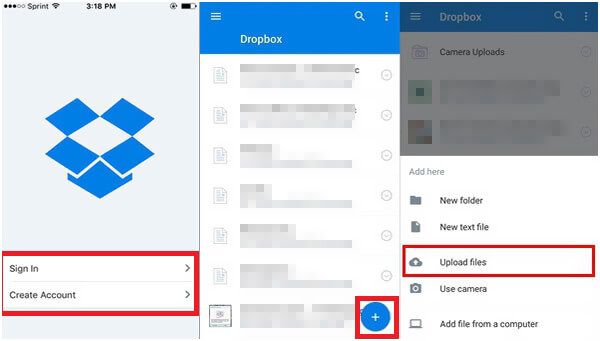
Similar a iCloud, Dropbox es otro servicio popular de almacenamiento en la nube. También ofrece una forma conveniente de transferir varios datos, incluidas fotos, desde iPhone a Android. Debe instalar la aplicación Dropbox en su dispositivo iOS y Android y luego seguir la siguiente guía para realizar la transferencia.
¿Puedo transferir todas las fotos de mi iPhone a mi Android a la vez?
Sí. Puedes usar la copia de seguridad de Google Fotos, un ordenador con transferencia USB o aplicaciones como FoneEase para transferir todas las fotos a la vez. Para grandes cantidades de fotos, se recomienda la copia de seguridad en la nube o la transferencia por cable.
¿Funcionarán las fotos HEIC tomadas con un iPhone en Android?
No necesariamente. Es posible que tu dispositivo Android no sea compatible de forma nativa con el formato HEIC, pero Google Fotos lo convertirá automáticamente para garantizar la compatibilidad antes de la transferencia.
¿Necesito conexión Wi-Fi para transferir fotos a través de Google Fotos?
Sí. Para realizar copias de seguridad y sincronizar fotos, sube a la nube de Google, lo cual requiere conexión a internet. Las bibliotecas de fotos grandes se cargan más rápido con una conexión Wi-Fi estable para evitar cargos por consumo de datos.
¿Es posible transferir solo algunas fotos, y no todas?
Sí, es posible. Aiseesoft FoneEase te permite previsualizar y seleccionar imágenes o álbumes específicos para transferir. Este proceso es muy sencillo e intuitivo en la pantalla de tu ordenador. Puedes probarlo.
Conclusión
Hablamos principalmente sobre cómo transferir fotos de iPhone a Android En esta publicación, después de cambiar de iPhone a Android, puedes usar los 4 métodos mencionados anteriormente para transferir todo tipo de fotos entre tu iPhone y tu teléfono Android. Entre ellos, recomendamos FoneEase, una solución integral que te permite transferir casi cualquier tipo de archivo.
 Guía paso a paso para transferir mensajes de WhatsApp entre Android y iPhone
Este artículo muestra una guía paso a paso sobre cómo transferir mensajes de WhatsApp desde iPhone X/8/8 Plus/7/6/6 plus/5s a teléfonos Android como Samsung Galaxy.
 Diferentes formas de transferir fotos a iPhone desde PC con Windows o Mac fácilmente
Aprende cómo transferir fotos desde tu PC o computadora Mac al iPhone X/8/7/6/5 sin o con iTunes en estos artículos.
 Formas útiles de transferir fotos de iPhone a iPhone
¿Quieres mover fotos del viejo iPhone al nuevo? Puede aprender cómo transferir fotos de iPhone a iPhone/computadora/Mac en esta publicación.
Transferencia de iPhone a Android
Transferir notas de iPhone a AndroidCambiar de iPhone a AndroidLanzamiento aéreo de iPhone a AndroidTransferencia de iPhone a AndroidTransfiere fotos desde iPhone a AndroidTransfiere videos de iPhone a Android
Aiseesoft MXF Converter es el software de transcodificación MXF/P2 MXF profesional y flexible que ofrece una solución de conversión MXF perfecta sin pérdida de calidad.
100% Seguro. Sin anuncios.
100% Seguro. Sin anuncios.

*Campo requerido
*Por favor ingrese un correo electrónico válido