
Ideal para: Convertir grabaciones caseras de baja calidad en locuciones de estudio profesionales, "listas para la radio".
Video Converter Ultimate
 100% Seguro. Sin anuncios.
100% Seguro. Sin anuncios.
Es común reparar el audio para eliminar zumbidos de fondo no deseados, ruido de tráfico o ecos molestos. Ya sea para un creador de contenido, un educador o un usuario ocasional, una mala calidad de sonido puede arruinar toda la experiencia, incluso el contenido más valioso.
Existen herramientas relacionadas de corrección y edición de audio que afirman ayudar a eliminar el ruido. Sin embargo, eliminar el ruido manualmente con software tradicional suele ser lento y técnicamente complejo. Por eso muchos Reparadores de audio con IA Se están desarrollando y se están convirtiendo en el nuevo estándar.
Este artículo presenta las 4 mejores herramientas de reparación de audio con IA que vale la pena probar. En comparación con los métodos tradicionales, estas herramientas utilizan inteligencia artificial para analizar y restaurar tu audio de forma inteligente, ahorrándote tiempo y esfuerzo. Puedes seleccionar la que prefieras para mejorar las voces, aumentar la frecuencia de muestreo y la profundidad de bits, y lograr un sonido de calidad profesional.
| Reparador de audio AI | Ideal Para | Precio | Plataforma | formatos compatibles | Características principales | Límites |
| Reparador de audio con IA para podcasts de Adobe | Locuciones y podcasts profesionales | Suscripción Premium gratuita (prueba de 30 días) | Web (Opcional) | Audio (MP3, WAV) Vídeos (MP4, MOV) | Eliminación de eco, análisis de grabación en tiempo real, transcripción automática, edición y mejora de voz. | Requiere conexión a internet. Sonido artificial ocasional. |
| Reparador de audio con un solo clic de Audo Studio | Corrección de audio por lotes rápida con un solo clic | Planes freemium (minutos limitados) / Planes de pago | Web (Opcional) | MP3, M4A, WAV, FLAC | Fijación con un solo clic, excelente eliminación de zumbidos y estática, autonivelación. | Control mínimo sobre la IA, versión gratuita limitada, sin reconstrucción generativa. |
| Mejorador de audio con IA de Flixier | Redes sociales y colaboración en equipo | Freemium (exportaciones limitadas) Planes de pago | Web (Opcional) | La mayoría de las importaciones de audio/video en la nube. | Renderizado rápido en la nube, edición de vídeo/audio todo en uno, funciones de colaboración en equipo. | El plan gratuito incluye marcas de agua, tiempo de exportación limitado y se requiere suscripción para acceder a todo el contenido. |
| Eliminación de ruido de audio Aiseesoft VCU AI | Limpieza de vídeo y audio sin conexión, todo en uno. | Suscripción Gratis | Windows, macOS (sin conexión) | Más de 1000 formatos de audio y vídeo | Procesamiento local, eliminación de ruido mediante IA, aislador vocal mediante IA, amplificador de volumen mediante IA, sincronización de audio mediante IA, múltiples herramientas de edición y mejora. | Las funciones avanzadas requieren una versión de pago. |
Con tantas herramientas de corrección de audio basadas en IA disponibles, elegir la adecuada puede resultar abrumador. Antes de profundizar en las recomendaciones específicas, nos gustaría destacar algunos factores clave a tener en cuenta al seleccionar la mejor herramienta de corrección de audio con IA para sus necesidades.
Esta sección ofrece un análisis detallado de cada herramienta de corrección de audio con IA recomendada. Podrás comparar sus características principales, fortalezas, debilidades y otra información para seleccionar rápidamente la que mejor se adapte a tus necesidades.
Ideal para: Convertir grabaciones caseras de baja calidad en locuciones de estudio profesionales, "listas para la radio".
puntuación:4/5
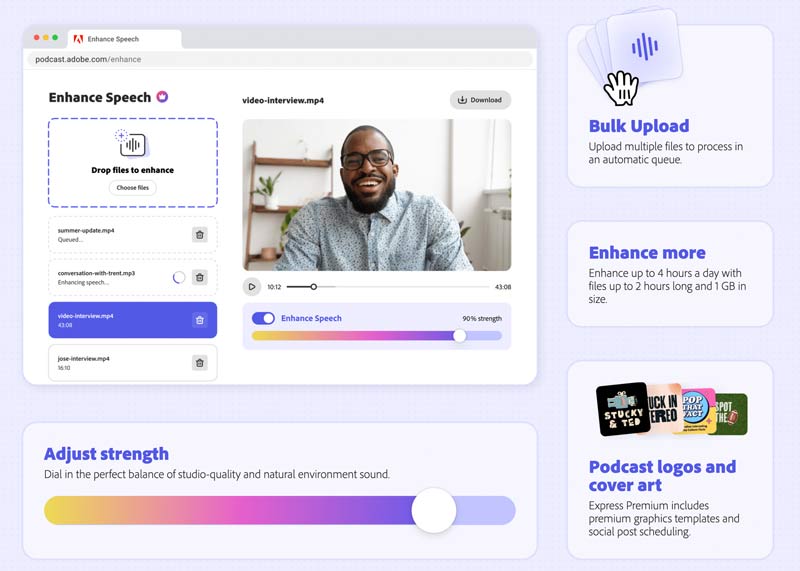
Si buscas un programa de corrección de audio con IA en línea, probablemente te recomiende Enhance Speech de Adobe. Este programa se utiliza principalmente para limpiar el audio y hacer que tus grabaciones de voz sean más profesionales. Puedes acceder a Enhance Speech desde la versión web de Adobe Podcast y su software Express de escritorio. Adobe AI Audio Fixer puede identificar y eliminar automáticamente el ruido de fondo no deseado. Simplemente sube tu grabación de audio y deja que Enhance Speech se encargue del resto. Incorpora IA avanzada para detectar mejor el ruido del tráfico, el micrófono, el aire acondicionado y más. Con la versión gratuita, solo puedes subir un archivo de audio en menos de 30 minutos y el tamaño máximo es de 500 MB. Para superar los límites, puedes optar por actualizar a Adobe Express Premium.
Ventajas:
Desventajas:
Ideal para: Creadores de contenido y educadores que necesitan la forma más rápida posible de eliminar el ruido ambiental y normalizar el volumen sin ninguna configuración técnica.
puntuación:4.5/5
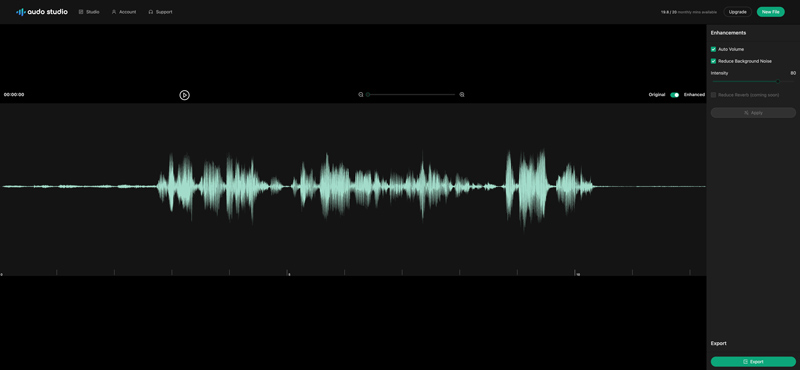
Audo Studio es una plataforma web de IA, principalmente para la limpieza de audio. Emplea las últimas tecnologías de aprendizaje automático y procesamiento de audio para limpiar tu audio y mejorar su calidad. Este reparador de audio con IA puede eliminar eficazmente diversos ruidos de fondo, como el tráfico, el viento, el zumbido y más. Además, ajusta automáticamente el volumen para garantizar un sonido óptimo. Próximamente, añadiremos la nueva función de reducción de eco a la herramienta de reparación de audio. Ofrece una forma sencilla de reparar el audio y mejorar la calidad. Es compatible con todos los formatos de audio más comunes, como MP3, M4A, WAV y FLAC. Para usar este reparador de audio con IA, debes registrarte. Como nuevo usuario de Audo Studio, recibirás un videotutorial de 3 minutos para empezar. Sube tu archivo de audio, activa las funciones de mejora y haz clic en el botón "Aplicar". Puedes previsualizar el audio mejorado y luego exportarlo.
Ventajas:
Desventajas:
Ideal para: Creadores de redes sociales y equipos de marketing que necesitan limpiar voces en off y editar videos simultáneamente a alta velocidad.
puntuación:4.5/5
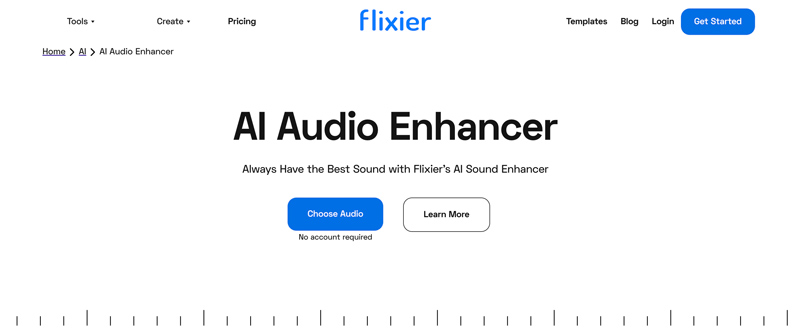
Flixier es una plataforma de grabación, edición y creación de videos con todas las funciones. Para la reparación de audio, tiene un AI Audio Enhancer individual. Flixier afirma que combina la tecnología de inteligencia artificial más reciente para garantizar un resultado de mejora de audio de alta calidad. Este reparador de audio con IA en línea puede ayudar eliminar el ruido de fondo, como tráfico, zumbido y más. Te permite mejorar tu voz para diversos fines. Además, AI Audio Enhancer puede ajustar automáticamente el volumen para una mejor experiencia auditiva. Puede reparar audio en todos los formatos más comunes. Puedes reparar audio desde tu dispositivo y servicios en la nube como Google Drive, Dropbox y OneDrive. Una vez que hayas subido el audio, arrástralo a la línea de tiempo y haz clic para seleccionarlo. Después, puedes usar las opciones de la sección "Mejorar Audio" para mejorar la calidad del audio.
Ventajas:
Desventajas:
Ideal para: Creadores y aficionados en general que necesitan una herramienta de escritorio rápida y sin conexión para limpiar el ruido de fondo y mejorar la claridad del diálogo en archivos de audio y video.
puntuación:5/5
Aiseesoft Video Converter Ultimate Es una herramienta multimedia versátil que combina la conversión rápida de vídeo y audio con funciones de mejora de audio basadas en IA. El software incluye herramientas específicas como Eliminador de Voz con IA, Aislador de Voz con IA, Amplificador de Volumen, Compresor de Audio y Sincronizador de Audio para gestionar el audio. Además de corregir el audio y limpiar pistas ruidosas, la IA puede realizar una reconstrucción de audio generativa completa de forma inteligente.
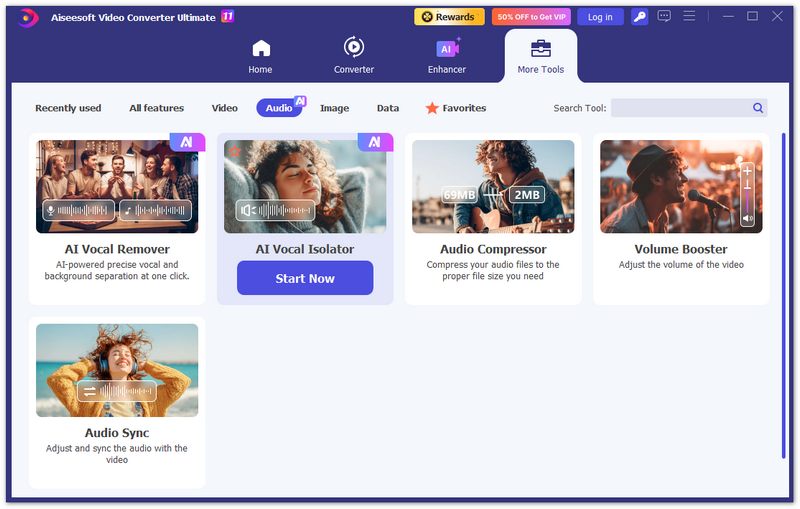
Destaca por eliminar el ruido de fondo, aislar las voces y mejorar la claridad de forma eficiente. Todas las operaciones se procesan localmente en tu ordenador para mayor velocidad y privacidad. Esto lo convierte en la solución ideal para creadores que buscan una limpieza de audio rápida y fiable en vídeos o archivos de audio independientes, sin depender del procesamiento en la nube ni de estaciones de trabajo de audio digital (DAW) complejas.
100% Seguro. Sin anuncios.
100% Seguro. Sin anuncios.
Ventajas:
Desventajas:
¿Existe una IA gratuita para mejorar el audio?
Sí, existen muchas herramientas de edición y reparación de audio con IA que pueden ayudar a mejorar el audio gratis. La mayoría de ellas son herramientas basadas en web, como Flixier AI Audio Enhancer, Neural Love AI Enhance and Upscale Audio, Audioenhancer.ai Audio Enhancer, Adobe Podcast Enhance Speech y más. Estas herramientas en línea utilizan IA para mejorar la calidad de sonido general de su archivo de audio. Este proceso de mejora de audio generalmente incluye reducir el ruido de fondo, mejorar la claridad y mejorar el audio de baja resolución. Sin embargo, debes saber que algunas funciones avanzadas de estas herramientas de inteligencia artificial gratuitas están limitadas a sus planes pagos.
¿Qué hace que un AI Fixer sea diferente de un Reductor de Ruido?
Un reparador de IA utiliza inteligencia artificial para mejorar el audio de forma inteligente, mientras que la reducción de ruido solo elimina el ruido de fondo no deseado sin mejorar la calidad general del audio.
¿Puedes arreglar el audio en Premiere Pro?
Sí. Adobe Premiere Pro proporciona varias funciones y opciones para reparar audio y mejorar su calidad. Por ejemplo, puede confiar en sus herramientas de mejora de audio como reducción de ruido, ganancia de audio, ecualizador y voz mejorada para mejorar toda la calidad del audio con facilidad. Además, le permite ajustar algunos efectos de audio como EQ, Reverb y Delay para arreglar el audio.
Conclusión
Si bien la edición de audio, más allá del recorte, la fusión y la mezcla básicos, suele requerir limpieza y mejora de la calidad del sonido, este artículo recomienda cuatro herramientas confiables para la reparación de audio.
El mejor" Reparador de audio AI No se trata necesariamente de elegir la herramienta con más funciones, sino la que mejor se adapte a tu flujo de trabajo y necesidades de privacidad. Para la restauración de voz pura, Adobe Podcast es la referencia, aunque requiere una conexión a internet estable y puede resultar costosa para contenido extenso. En cuanto a privacidad y velocidad, Aiseesoft Video Converter Ultimate destaca por procesar el audio localmente en la GPU, manteniendo los datos en tu ordenador y ofreciendo resultados más rápidos que las herramientas en la nube.
Los creadores de contenido obtienen el máximo provecho con Flixier, que combina la corrección de audio con potentes funciones de edición de video. En 2026, no hay razón para conformarse con un audio mediocre: estas herramientas de IA pueden convertir una grabación ruidosa hecha con el móvil en una obra maestra con calidad de estudio en cuestión de segundos.
 ¿Qué es la cancelación de ruido? Datos sobre la cancelación de ruido y más
¿Qué es la cancelación de ruido? Bueno, millones de usuarios ya tienen una consulta sobre este tema. ¡Por esa razón, creamos esto para que lo leas!
 Revisión puntual de Music Mixer sin conexión, en línea, aplicaciones y dispositivos
Los mezcladores de música son software o dispositivos que pueden ayudarlo a mezclar señales de audio para que suene perfecto. Lea esto para saber más sobre los mezcladores que puede usar.
 Una guía para eliminar voces y las 7 mejores opciones para eliminar voces
¿Cuál es la mejor aplicación para eliminar voces? ¿Puedo eliminar voces de una canción online gratis? ¿Puede Audacity ser un eliminador de voces? Consulte las siete mejores herramientas para eliminar voces.
Video Converter Ultimate es un excelente conversor, editor y potenciador de video para convertir, mejorar y editar videos y música en 1000 formatos y más.
100% Seguro. Sin anuncios.
100% Seguro. Sin anuncios.

*Campo requerido
*Por favor ingrese un correo electrónico válido
