Desbloqueo iPhone Aiseesoft
 100% Seguro. Sin anuncios.
100% Seguro. Sin anuncios.
Si tienes un iPhone 7, puede que te hayas encontrado con un problema frustrante: tu iPhone está bloqueado con un operador específico. Esto es especialmente común cuando compras un teléfono a través de un operador y este lo vincula a su red. ¡Pero no te preocupes! Desbloquear la SIM de tu iPhone 7 es más fácil de lo que crees. En este artículo, te mostraremos el proceso paso a paso para... Desbloquea la SIM de tu iPhone 7 y 7 Plus, incluyendo consejos para desbloquearlo gratis e incluso cómo evitar ciertas restricciones. ¿Listo para liberar tu iPhone? ¡Comencemos!

¿Qué es exactamente un bloqueo de SIM? Piensa en ello como una restricción que tu operador original de telefonía celular (el operador) le impone a tu iPhone 7. Esta restricción te impide usar la tarjeta SIM de cualquier otra compañía en tu teléfono. Si quieres:
• Portadores de conmutación: Quizás otra compañía tenga un mejor plan de datos, o por fin te estés cambiando a ese paquete con todo ilimitado. Si tu teléfono está bloqueado, no puedes simplemente cambiar de número.
• Viajar internacionalmente: ¡Este es el gran problema! Créeme, usar una tarjeta SIM local mientras viajas es la mejor opción para tu bolsillo, y es mucho mejor que pagar esas tarifas astronómicas de roaming internacional. Un teléfono bloqueado lo hace imposible.
• Vende tu iPhone por más: Un iPhone 7 desbloqueado, especialmente uno que pueda presumir de ser un dispositivo genuinamente abierto, vale mucho más que uno bloqueado. ¡La gente paga un precio por la libertad!
Saber cómo desbloquear la tarjeta SIM del iPhone 7 significa tomar las riendas de tu propio destino móvil. Vayamos a lo bueno.
Hay dos formas principales de liberar tu iPhone 7. La primera es siempre la mejor y la segunda es una opción para situaciones difíciles.
Esta es la solución definitiva. Tu operador es la única entidad que puede eliminar de forma oficial y permanente el bloqueo de la tarjeta SIM de tu iPhone 7 y, gracias a las regulaciones y políticas modernas, suele ser gratuito si cumples con sus requisitos.
Así es exactamente cómo desbloquear la SIM del iPhone 7 y 7 plus gratis o el modelo estándar:
Antes de llamar, recopila la información de tu teléfono y comprueba si cumples los requisitos. Estos suelen incluir:
• Finalización del contrato: ¿Cumpliste completamente con tu plan de pagos o contrato? Si compraste el teléfono a plazos, debes pagarlo en su totalidad.
• Estado de la cuenta: ¿Su cuenta está al día? Sin facturas vencidas ni otros problemas administrativos.
• Tiempo en la red: Algunos operadores requieren que el teléfono haya estado activo en su red durante una cierta cantidad de días (por ejemplo, 40 a 60 días).
• Número IMEI: Necesitas el ID único de tu teléfono. Para obtenerlo, simplemente marca * # # 06 en tu iPhone 7. ¡Escribe este número de 15 dígitos!
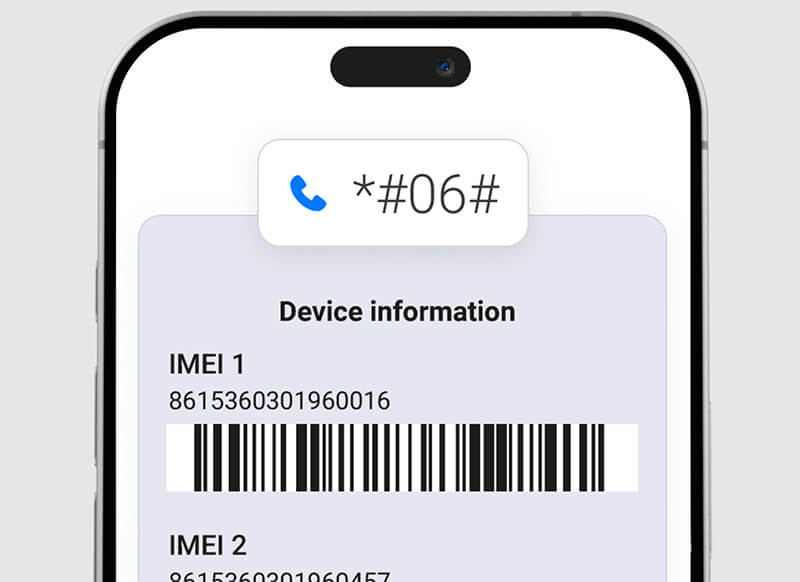
Aunque creas que ya lo has pagado todo, siempre compruébalo dos veces. Es mejor confirmarlo ahora que que te lo nieguen después. Además, tener el IMEI a mano cuando llames te hará parecer un profesional.
Llame o utilice el servicio de chat en línea de su operador.
Dígales claramente que necesito solicitar un desbloqueo de SIM para mi iPhone 7 (o 7 Plus) porque he cumplido con mi contrato.
• Verificarán su elegibilidad utilizando la información de su cuenta y el número IMEI.
El operador enviará una solicitud a Apple. Este proceso no es inmediato. Apple suele tardar entre 2 y 10 días hábiles en procesar el desbloqueo.
No recibirás un código como en los teléfonos antiguos. Una vez que el operador confirme que se ha procesado el desbloqueo, debes hacer una de estas dos cosas:
1. Si tienes la SIM original: Inserta una tarjeta SIM de otro operador. Tu teléfono se conectará a la red Wi-Fi y completará automáticamente el proceso de desbloqueo. Verás un mensaje que indica "SIM no compatible", seguido de un mensaje que confirma el desbloqueo.
2. Si aún no tienes una nueva SIM: Haz una copia de seguridad de tu iPhone 7, bórrala y restáurala desde la copia de seguridad. Esto obliga al dispositivo a consultar con los servidores de Apple y a aplicar el desbloqueo. Esta es una forma común de averiguar cómo desbloquear un iPhone 7 o 7 Plus sin tarjeta SIM (si no tienes la nueva a mano). De esta manera, puedes saber... Si tu teléfono está desbloqueado sin tarjeta SIM.
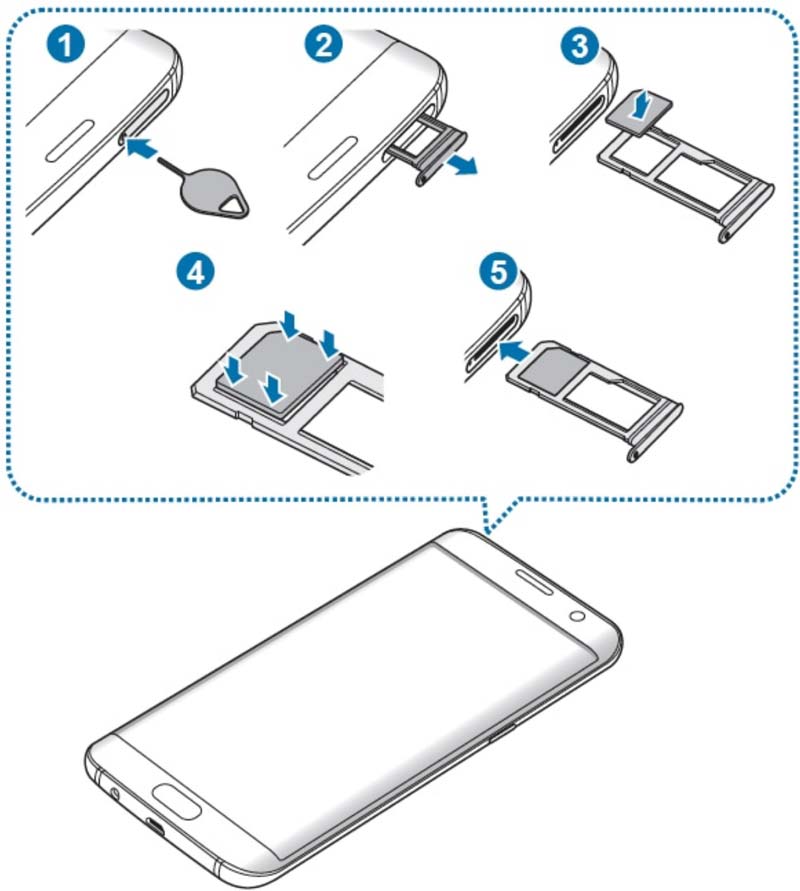
Y así, ya has descubierto cómo desbloquear el PIN de la red SIM de tu teléfono móvil.
A veces, el operador se niega (por ejemplo, si le compraste el teléfono a un amigo que aún debe dinero del plan) o simplemente no quieres esperar. Aquí es donde entran en juego los servicios de desbloqueo en línea de terceros.
Si bien se aplica una tarifa, estos servicios pueden procesar rápidamente el desbloqueo del operador porque tienen acceso directo a bases de datos especializadas y mayoristas.
Tenga mucho cuidado. Utilice únicamente servicios de confianza que ofrezcan garantía de devolución de dinero. Es fundamental buscar en Google reseñas de servicios de desbloqueo de iPhone antes de gastar dinero. Normalmente paga por un proceso más rápido, pero necesita proporcionar su IMEI, así que asegúrese de que el sitio sea seguro.
Aprende aquí para Comprueba tu IMEI en línea, para que puedas desbloquear tu iPhone sin problemas.
Ahora que tu iPhone 7 está desbloqueado por tu operador, podrías encontrarte con otro tipo de bloqueo: el PIN de la SIM. Esta es una función de seguridad que controlas y que impide que personas no autorizadas usen tu tarjeta SIM para hacer llamadas o acceder a tus datos si te roban el teléfono.
Si al encender el teléfono te aparece un mensaje que te solicita el bloqueo de la SIM o el PIN, esto es lo que te sucede. ¡Es diferente del bloqueo del operador!
A continuación se explica cómo desbloquear la configuración de bloqueo de la SIM del iPhone 7:
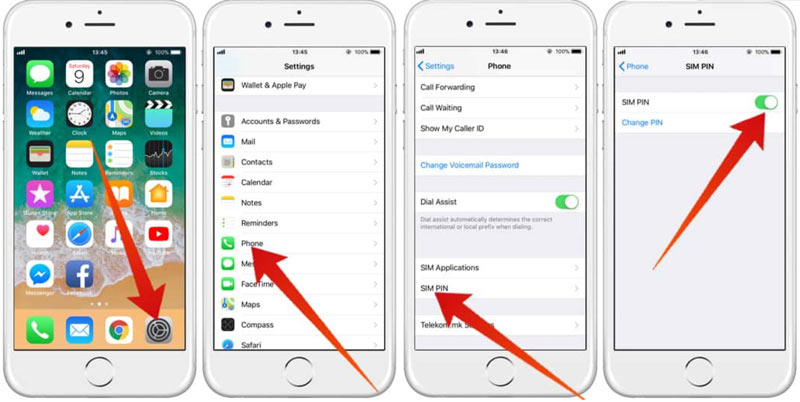
Si introduces el PIN de la SIM incorrectamente tres veces, tu tarjeta SIM se bloqueará al instante y necesitarás un código PUK (Clave de Desbloqueo Personal) para recuperarla. Si alguna vez te encuentras en este apuro, contacta con tu proveedor de servicios actual inmediatamente para obtener el código PUK. ¡No lo adivines! Adivinar el código PUK varias veces puede desactivar permanentemente tu tarjeta SIM y, en ese caso, necesitarás una nueva. Esto es clave si quieres saber cómo desbloquear una tarjeta SIM sin el código PUK para el iPhone 7, y la respuesta es que no puedes adivinarlo. ¡Necesitas el PUK del operador!
Supongamos que has superado el bloqueo de la tarjeta SIM, pero has olvidado la contraseña de la pantalla o has comprado un teléfono bloqueado con un ID de Apple antiguo. Este es un bloqueo independiente para cada dispositivo.
Si te preguntas cómo desbloquear un iPhone 7 sin una tarjeta SIM y un código de acceso porque estás completamente bloqueado del sistema operativo, es posible que necesites una herramienta dedicada. Desbloqueo iPhone AiseesoftEsta herramienta está diseñada para problemas de desbloqueo más graves que van más allá de la tarjeta SIM:
• Borrando el código de acceso: Si olvidó el código de acceso de la pantalla (de 4 o 6 dígitos), esta herramienta puede ayudarle a eliminarlo y permitirle volver a ingresar a su teléfono.
• Eliminar ID de Apple: Si el propietario anterior dejó su ID de Apple iniciada sesión, lo que le impide utilizar sus propios servicios, Unlocker puede ayudarle a eliminarlo (asumiendo que Buscar mi iPhone está desactivado en ciertas versiones de iOS).
• Eliminación del código de acceso de Screen Time: ¡Incluso puede ayudar si olvidaste la contraseña restrictiva de Tiempo de pantalla!
.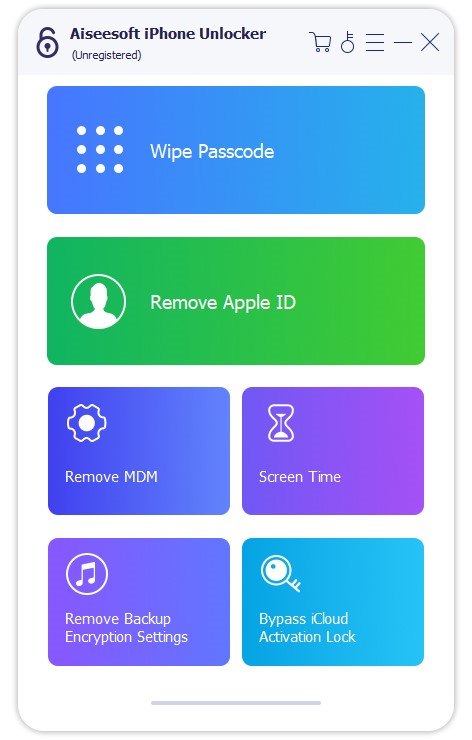
Si bien Aiseesoft no soluciona el bloqueo del operador, es una opción brillante para solucionar otros problemas de bloqueo comunes que le impiden disfrutar de su iPhone 7, especialmente cuando necesita una solución profesional y confiable.
100% Seguro. Sin anuncios.
100% Seguro. Sin anuncios.
¿Realmente puedo desbloquear mi iPhone 7 gratis?
¡Sí! La forma más confiable: contactar a tu operador original después de liquidar tu contrato es el método oficial y gratuito para desbloquear la SIM del iPhone 7 Plus.
¿Desbloquear mi iPhone 7 anula la garantía?
No. El desbloqueo del operador es una acción legal basada en políticas y no altera el software ni el hardware del iPhone, por lo que no anula la garantía de hardware de Apple.
Me sigue apareciendo un mensaje solicitando el PIN de la SIM. ¿Será el bloqueo del operador?
No, se trata del bloqueo del PIN de la SIM, una función de seguridad personal que tú o el anterior propietario configuraron. Consulta la Sección 2 para saber cómo desbloquear la SIM del iPhone 7 gestionando este PIN en Ajustes > Datos móviles > PIN de la SIM.
¿Qué pasa si no sé el código PUK de mi SIM?
Debes contactar con el operador que emitió la tarjeta SIM (la compañía que te proporciona el servicio telefónico) para recuperar el código PUK. No hay otra forma segura ni confiable de desbloquear la tarjeta SIM sin el código PUK del iPhone 7.
Conclusión
Obteniendo su iPhone 7 o 7 Plus desbloqueado por el operador Es una gran ventaja en cuanto a flexibilidad y libertad. Transforma tu teléfono, de un dispositivo conectado a una red, en un dispositivo verdaderamente versátil, compatible con cualquier tarjeta SIM del mundo.
Recuerda la clave: siempre empieza por tu operador. Es la forma oficial, más segura y económica de liberar tu dispositivo de forma permanente. Con tu número IMEI listo y un poco de paciencia durante el proceso, ¡cambiarás de SIM y disfrutarás de servicio internacional en un abrir y cerrar de ojos!
 Cómo desbloquear un iPhone 6 con o sin código de acceso
¿Cómo desbloquear un iPhone 6 si se olvida la contraseña? ¿Se puede desbloquear un iPhone 6 deshabilitado? Aprende 4 maneras de desbloquear un iPhone 6, incluso sin la contraseña.
 Desbloquear iPhone 14 o 14 Plus/Pro/Pro Max sin código de acceso
¿Es posible desbloquear un iPhone 14 bloqueado? ¿Se puede desbloquear un iPhone 14 con eSIM bloqueada? Consulta la guía sobre cómo desbloquear el iPhone 14, con o sin código.
 Cómo desbloquear tu iPhone 11 con o sin código de acceso
¿Cómo se omite el código de acceso en un iPhone 11? ¿Se elimina el bloqueo de iCloud al restablecer la configuración de fábrica? Aprende cuatro métodos sencillos para desbloquear tu iPhone 11 o 11 Pro.
Consejos para desbloquear iOS
Desbloquear la pantalla de iOS
Omitir el bloqueo de activación de iOS
Recuperar datos de iOS
Para reparar la pantalla del iPhone bloqueada, la función de borrado de contraseña puede ayudarlo mucho. Y también puede borrar fácilmente la ID de Apple o la contraseña de Screen Time.
100% Seguro. Sin anuncios.
100% Seguro. Sin anuncios.

*Campo requerido
*Por favor ingrese un correo electrónico válido